
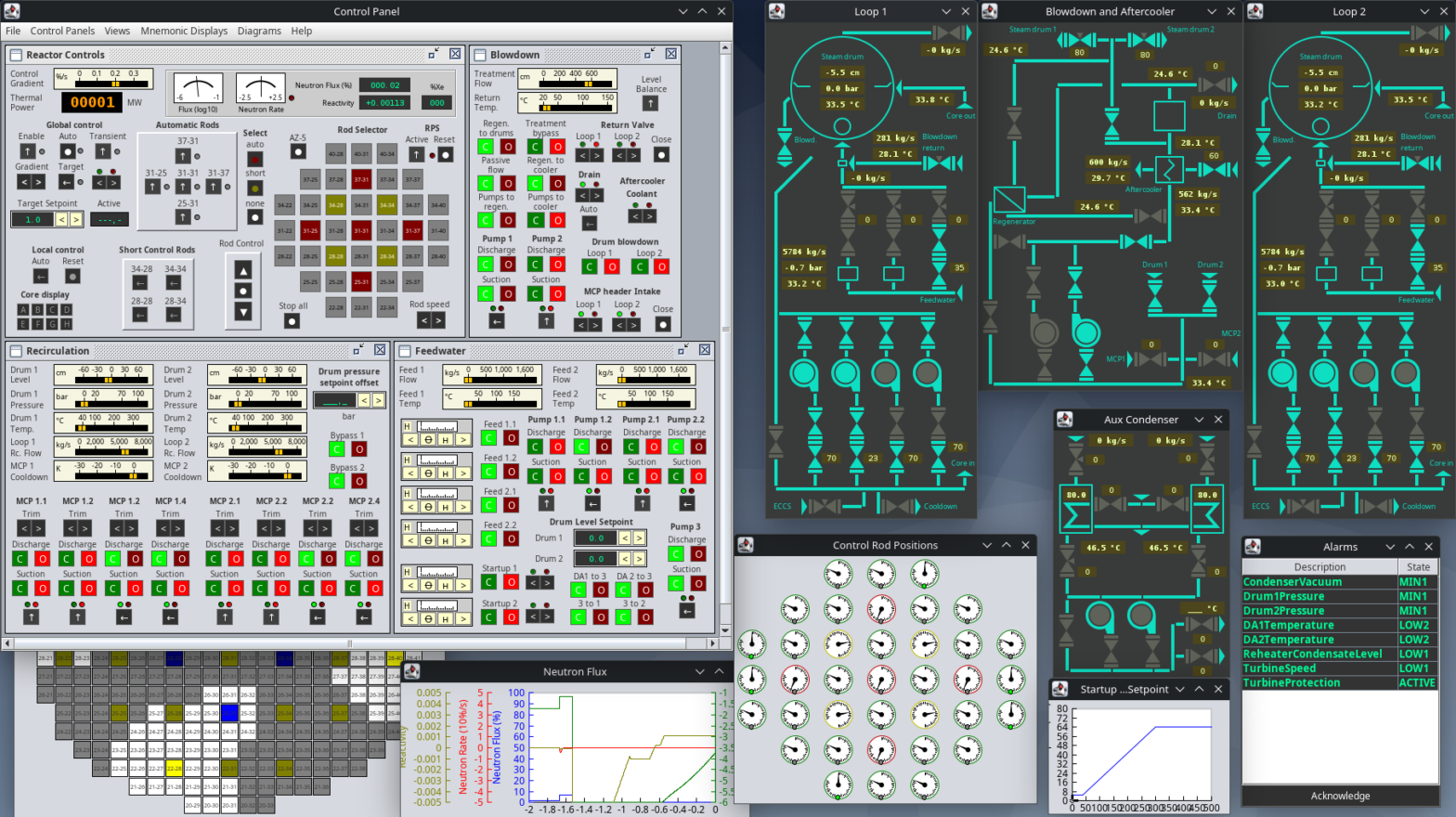
Operating power plants requires a detailed understanding on how different systems of the plant interact with each other, how water and steam are used to transfer energy and the limitation of control loops. This simulator allows you to try to start up the Chernobyl RBMK reactor, sync it to the grid and experience the complexity of power plant operation.
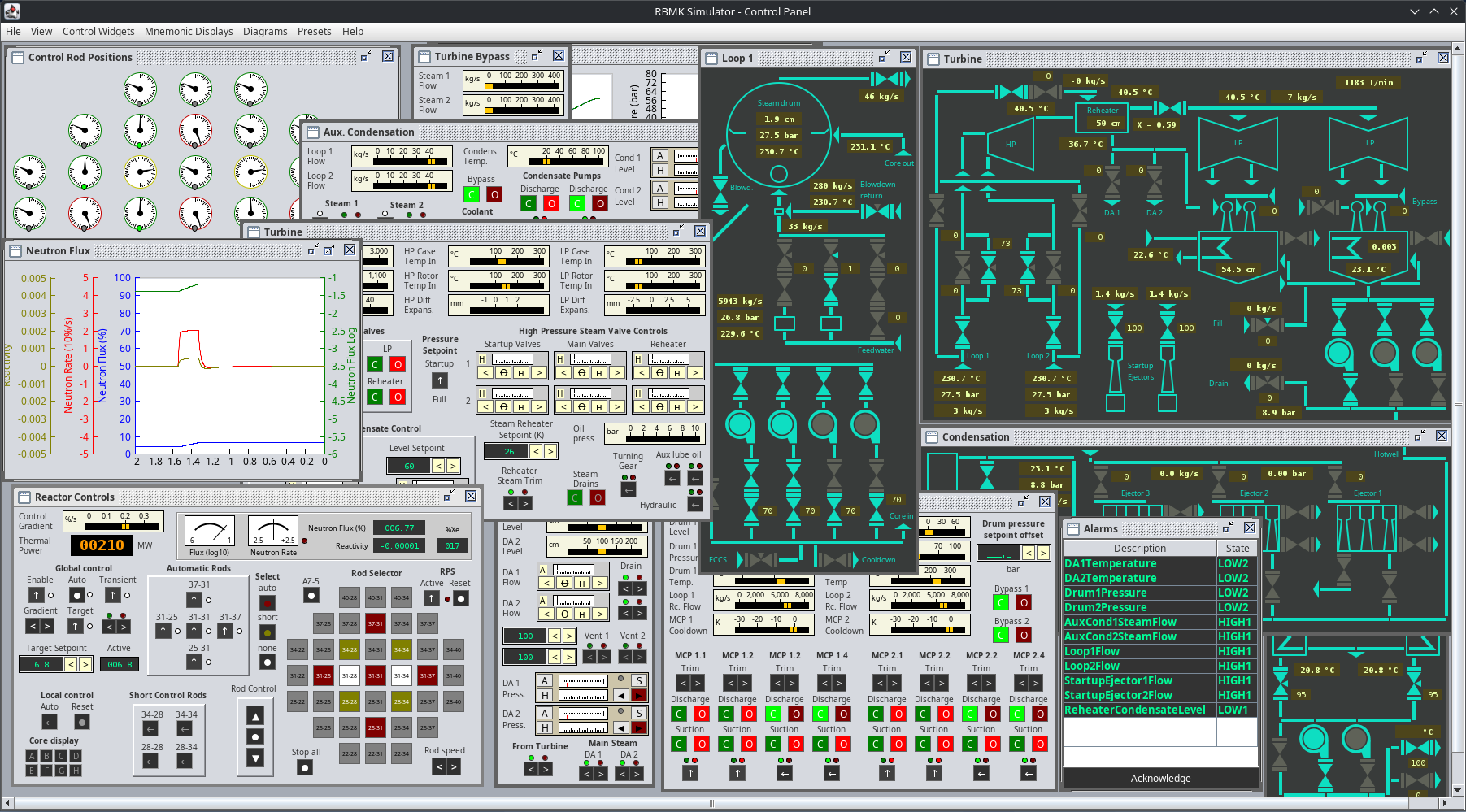
This project is currently in development. You can download the latest release on Github here. As it’s written in Java, it runs on pretty much every modern operation system. There’s a ready to run Windows executable available that runs out of the box or just the jar file that runs on any decent Java runtime.
This simulator focuses on operating the thermal systems of the power plant and is simplified in a way that it can be handled by one person. It is quite difficult for one person to be honest.
It features:
- Two steam drum separators (instead of 4)
- Simplified reactor with 5 automatic, 28 manual and 4 short control rods (instead of 170).
- One turbogenerator with steam reheater
- Mnemonic displays inspired by the actual control room
- Convenient line plots to monitor measurement time series
- Accident sequence (prompt neutron excursion) possible.
- Nasty reactor dynamics
- Network support for connecting additional clients to the simulation
Motivation
In 1998 there was a simulation called “Chernobyl: The Legacy Continues” which is actually a simplified, working power plant simulation. I used to work in coal fired power plants before and after my engineering graduation and had the chance to actually work on real control systems engineering, that simulator got my attention and I even wrote a startup manual for it. After switching to food machinery manufacturing I was able to finally deep dive into coding and got the skills to work on a successor to this masterpiece.
As I’m benefiting much of open source software here and many people provided valuable information free of charge, I decided to release this as free and open source software.
Usage
For a brief introduction, head to simulator usage. I strongly recommend you to read this as it contains the basics of operation.
For a in-detail manual on how to startup the plant step by step, head to Full Startup Manual.
More manuals:
Technical Background
The simulator is using a combination of a physical network simulation and state space modeling to model the entire plant. To allow simulations in a broad range, things are simplified in a way that lacks numerical precision but allows a good dynamic behavior.
There is no real neutron simulation, the reactor is simplified by making nonlinear state space models that have an expected behavior. Basically it’s about balancing reactivity.
Hello, Viktor! Please excuse my use of Google Translate.
I would like to express my immense gratitude for the tremendous effort you have put, and continue to put, into creating this simulator. Although it is a simplified model of an RBMK-1000 reactor, I can only imagine the sheer amount of work you have invested, and continue to invest, in this project.
You are inspiring a new generation to explore the peaceful use of atomic energy and to pursue engineering studies.
With great respect,
Oleg Nemtsev, a student from Rostov-on-Don
Can somebody help me since for some reason the feed water,condenser,coolant,recirculation and Deaerators aren’t working for some reason please somebody at least help me or tell me is it because of the game mode since I don’t know where to change the game mode I’ve gone through every single file for the run time and app
Hi! Two questions:
1. Jumping back in after v0.3, I notice that the automatic control rods seem to do a lot more “hunting”—in some cases they overshoot the setpoint, then pull out enough that the protection systems trip and scram the reactor (if trying to ramp from say ~25% to ~30% neutron flux, at the default 0.2%/s gradient). Is this expected behavior? A consequence of PID functions still being tuned?
2. Following your startup procedure, I cannot reset the turbine protection for some reason. As someone who watched her HBO miniseries like a good girl, I of course solve this by disabling the turbine protection, which raises no further alarms in connecting to the grid and getting to ~1100 MW of electrical power. The turbine seems nominal, and if I hold at 750 rpm and then switch the protective system back on it stays on, but if the turbine isn’t running at all, trying to disable it just gives me:
(Turbine): Command refused, TPS still active.
My guess (?) is that something in the new turbine systems require slightly different steps (the startup guide doesn’t mention the hydraulic switch, for example), so my question is: is there anything we can do yet to help you, in terms of the documentation and procedure manuals?
The contribution guidelines still imply “no,” so is it most helpful for you to just log all those places where the startup guide seems to be out of date, or where tooltips are missing or unclear, etc.? I expect you already know most of those and I don’t want to waste your time.
This is an incredible project and I thank you for all your work on it. I had the chance to visit the Chornobyl power plant (decommissioned—just after the NSC went up) and everyone was very helpful, but nothing has been as instructive to me in understanding how an RBMK works (and, for that matter, how it can fail) as this simulation.
Hi, first of all, thank you for your efforts and your comment and reading through all the things I’ve written down. Due to some situation in my life I did not have the time necessary in the last weeks to continue properly (it is not as bad as it sounds, my kids just started school and there’s still a full time job to do), so things are not as fast as they should be.
To answer your questions: The issue might be the turning gear, it has to be turned off to clear the TPS, this was added with v0.4.2. I’ve added those steps to the startup manual. Bypassing the TPS will trigger some fallback and disable it as soon as the generator is synced.
I have to admit that I did not spend and excessive amount of time tuning the control loop. But the behavior you described is not intended. The idea was to have you as the operator to manage the manual control rods to keep the auto rods in a range where they can control the reactivity. If the auto rods are fully withdrawn by the controller (low position alarm), there will simply not be enough neutrons and the neutrons will slowly vanish, causing the neutron flux to drop. The RPS will only scram the reactor if the automatic control rods are fully inserted (high position alarm) and the controller can not further reduce reactivity on its own.
I’ve designed the simulation with the purpose in mind to have something educational that show how those various systems work together on the water-steam side, the reactor is simplified in this way to keep the effort required to interact with it on a low level. The real issue on those reactors is to have proper instrumentation that show you what is going on inside the core and switch between different control systems and sensors. There’s already a simulation out there covering this in quite an amazing way on Steam (Chernobyl: Simulator) and I decided not to go for a full scale totally accurate simulation and simplify it down to something that can be understood by someone who has no idea of how things work but is interested in finding out. It turned out that it is very hard to tune all those parameters in a way everything works together properly.
You guessed it right, it is most helpful for me to receive comments like yours as this points me in the direction where I need to go with the sim. As I know how to operate coal power plants quite well, I sometimes have no clue on what part is now missing and should be written down more detailed. But also every single hint on wrong or missing tooltip is welcome. Sometimes I just think “ah, lets do this later”, then something happens and then I just forget about it.
As the simulation grows, some architectural design decisions are becoming a problem and this is the most definite reason for the “no contributions”. For example, the alarm list is now flooded with alarms and I had no idea in the beginning that it would look like it looks now. Adding the ECCS also provides an issue as there are no mnemonics for those systems available and the ECCS controls are not intuitive in any way. I might change the alarm display and also add some display that shows only alarms for certain systems, but that requires reworks in the alarms core logic. At a certain point, pump failures might be added, so they can overheat if there is no flow for a certain period of time, but I’m no sure if I’m going to implement this – how would I do the repairs, I don’t know. If those decisions are done, any contributed manual will be outdated and I do not want people to waste their time with this. So, thanks again for you comment and I’m glad it helped you gain some knowledge on power plant operation!
Hi, uhhh my problem is im stuck in startup because i cant finde the Startup reducing valve the shutoof valve and the regulation valve. Still i give the game an 11/10!
Hi, I already got feedback that those are too hard to find. I’ll update the UI on this issue soon. Its those on the lower left of the feedwater panel, three different controls for each of the valves.
i can not fond the third startup valve, can somebody help me out
Hello,
Ive just recently got back into the program after feeling bored on a trip I took, I’ve installed the program on macos and it has been running nice.
I am just wondering will the “presets” be changed in the future to include all systems related to the panel? My only complaint is I’ve had to create my own widgets for the auxiliary condenser and CW systems, which takes time and is sort of an inconvenience.
But overall, the sim has gotten far smoother last time i tried it and is running well.
Hi, thanks for your feedback, highly appreciated. Yes, there’s no preset for the startup pressure control and I’m going to add some. At some point, there will be a feature to save user defined presets. But those things are of lower priority as long as there’s work to do on the simulation model itself so it will take time.
Hello!
I was wondering if there was a way to separate any of the control widgets or displays into external windows out of the control panel other then creating a new one entirely?
Really enjoying the sim so far
so i don’t know every detail but i remember that Chernobyl was do to extreme stress do to a test multiple failures and inserting straight graphite i was wanting to see every detail to study it myself i wanted to know if anyone knows how to make condisions similar
For a high detail simulation, check out Rikarins Project on Steam: https://store.steampowered.com/app/2702630/Chernobyl_Simulator
My project here is simplified so the stress situations you mentioned are not part of the Simulation 😉
I was wondering that when i operate at 3GWt and somehow the reactivity suddenly go down and shortly after that the power drop to 32MWt in like 30 secone why is this happening? Is it a bug? If not how do i prevent it?
Hi, there are many things that can go wrong. When doing a proper startup you should be able to have no alarms from about 60 % power level. Something is wrong and there is an alarm that should give you a hint what exactly you need to look for 🙂 There are some nasty effects in reactivity than continuously require you to watch the reactor.
Aight thank you lately i manage to try not make it happen and it work!
Does the simulation run in real time? In other words, would it take about 36 hours to start up the reactor following all the protocols?
Hi, it runs in real time but the modeled plant is modified in a way that does not require such long startup procedures. Turbine warming usually takes forever as it is tons of steel, the simulation only has some kilograms of mass there so those times are dramatically reduced. I tried to balance those timings in a way it is not needed to wait for unnecessary long periods of time.
Hello! Thank you for this very detailed simulator, I have a lot of fun playing with it! Really gives me a further understanding on how a nuclear power plant works. After a little bit of trial and error I manage to get it into 3200 MWth and generating 1000 MWe.
Tho I found something that appears to be a bug (please correct me if this is wrong). Whenever I tried to ramp down the reactor from 100% to < 10%, either very gently or with AZ-5, this error message appears and the simulation stops:
com.hartrusion.modeling.exceptions.CalculationException: Heat energy requsted but it is not in required updated state.
– at com.hartrusion.modeling.phasedfluid.PhasedNode.getHeatEnergy(PhasedNode.java:119)
– at com.hartrusion.modeling.phasedfluid.PhasedNoMassExchangerHandler.getInTemperature(PhasedNoMassExchangerHandler.java:301)
– at com.hartrusion.modeling.heatfluid.HeatNoMassEnergyExchangerHandler.doThermalCalculation(HeatNoMassEnergyExchangerHandler.java:139)
– at com.hartrusion.modeling.heatfluid.HeatAbstractFlowResistance.doCalculation(HeatAbstractFlowResistance.java:61)
– at com.hartrusion.modeling.solvers.DirectedFlowSolver.drainWorklist(DirectedFlowSolver.java:365)
– at com.hartrusion.modeling.solvers.DirectedFlowSolver.doCalculation(DirectedFlowSolver.java:283)
– at com.hartrusion.modeling.solvers.TransferSubnet.doCalculation(TransferSubnet.java:1005)
– at com.hartrusion.modeling.solvers.DomainAnalogySolver.lambda$buildSolverBatches$0(DomainAnalogySolver.java:258)
– at java.base/java.util.concurrent.FutureTask.run(Unknown Source)
– at java.base/java.util.concurrent.ThreadPoolExecutor.runWorker(Unknown Source)
– at java.base/java.util.concurrent.ThreadPoolExecutor$Worker.run(Unknown Source)
– at java.base/java.lang.Thread.run(Unknown Source)
The version I have is v0.3.5. Thank you!
Hi, thanks for this and your report. Seems like there is an issue with the changed solver algorithm, I’ll investigate this. You can try using the previous v0.3.4 release, this should not have this issue as the internal calculations are done in a way different manner and that one is well tested.
I am from Ukraine, I am 27 years old, and I am very curious of RBMK-1000. I am senior Power Plant operator on the diesel-electric ship (72600 kW nominal power; 6x DGs V12 engines). Could I buy this simulator just for myself and for my curiosity. I wanted to study physics, but couldn’t because of the war. But I am marine engineer and operator with few years experience. I have technical background and good real diploma. I have my Asus ROG Strix and want to try this simulator, but don’t know if I can buy. How much does it cost? This reactor was a little bit overengineered and wasn’t properly tested, what led to disaster in 1986.
Second Engineer Power Plant here…. RCCL… Azipod…
From Gdynia Maritime University
Hi, it’s free, there’s no price to pay. I used a lot of free software, people helped and shared viable documents with me for free, so here’s a free RBMK simulator. Just download the release on github with the link provided
I want play the simulator
where are you now? have you installed it?
I have very powerful CPU Ryzen 8cores, 64GB RAM and NVIDIA RTX 2080 but this Simulator barely works on my setup. Buttons react with delay, windows move so slow that I can see them being redrawn. Yet, on your GitHub stated that “It has many systems simplified to allow running even on low end hardware.” Something is not right.
Well, it runs almost fine on my ThinkPad X380 with i5-8250U CPU and just 8 GB of RAM, that’s the slowest hardware I have available for testing. The GUI works fine, no issues with window redrawing or such things. The other notebook available with Windows 11 is also around 5 years old and shows no issues. There’s no feedback like yours so far so I do guess it’s related somehow to your setup. Do you use some kind of upscaling to high DPI or show everything at the same time on one 4K monitor? Which release file did you use? When do those problems occur, right from start or with specific windows open? Have you tried to run the .jar file with a different Java distribution or did you use the bundled exe file provided?
I am using latest release of simulator, and my flavour of Java is IBM Semeru. I open just two windows Control rod position and Reactor Controls, then try to raise some rods and the program significantly slows down.
Did some testing with the Semeru JRE and Windows 10 and it is in fact significantly slower. It takes almost double the time to do all calculations and the GUI seems to lack resources when drawing the gauges. Having screen DPI scaling active gives a horrifying experience. There is some rework on the solvers planned anyway but for now I suggest you try using Adoptium Temurin. Solver rework will change the way multi threading is used which might trigger the issue but that will take some more weeks. Thanks for your report.
I have tried the latest release of Adoptium Temurin, but it looks like everything became even much slower. Sorry to say that. But I will wait for the next version of your simulator.
Well that’s how things work, I can’t and won’t filter feedback, so no need to say sorry. In fact, thank you for testing and reporting, this helps making the simulation better and avoid further bad experiences. I will priorize the solver rework with different thread use so there should be more resources available for the GUI in next release, hopefully that fixes the issues you have. It will take a week or so.
Hi Andre, I’ve made some changes in the solving algorithm with v0.3.5 which is now available for download. Let me know if performance is still as slow as before or if that helped. The amount of parallel threads have been damatically reduced.
What version of Java do you recommend? I am on Windows 10
Is there any discord servers ? I have questions. my drum 2 keep filling for some reasons/
No, there’s no discord, I don’t think I have time to manage community. Please send a save file via contact form and I’ll take a look what’s going on (and maybe implement a fix)
If you are interested in the real designs and schematics you might want to look at https://inis.iaea.org/collection/NCLCollectionStore/_Public/18/001/18001971.pdf
It’s the soviet report for the IAEA about Chernobyl accident. From page 276 you can find schematics and design values.
That aside thank you and please keep releasing updates ( can’t wait for the deareators vents to be functional).
There’s a little bug: MCPs 1.3 and 2.3 are labeled 1.2 and 2.2 respectively.
Any chance for an x86 (32 bit) version for those of us with older machines?
Hi Steve, the simulator releases are build with Java 17 and they include a standalone build for Windows x64 for convenience, but the release also includes the .jar-File that can be run with any Java 17 runtime and newer on any plattform. Adoptium provides Java 17 for x86, I suggest you try downloading Temurin 17 JRE for x86. If no jar file extension is configured in your OS by that installation, you can run the jar file with the command “java -jar RbmkSimulator.jar” from command line.
I’ll give it a go…thank you
Hi, i noticed there is a “start server button” and a client exe where you enter an ip, how do you start the server, cause the button appears to do nothing, where would one loctate the ip to enter and join frineds
It starts a server on port 26486 on your computer and clients can connect to that using your IP address. I will add some feedback on server state some day. It’s not designed to be used via unsecure internet connections, just in local network or using VPN. Hosting directly via the internet is possible but I highly recommend not to do that as the connection is not encrypted.
I was wondering if the different presets (all controls & all mnemonic displays) were on a different UI such that it could be quickly ‘alt-tab’ ed for people like me who dont have multiple displays or keybinds to switch between different presets.
These are just so that we dont waste precious time on switching between controls and data pages during critical moments.
Thx 🙂
Hi, you can just use “File” – “New Panel Window” and that will open a new window which can be used for exactly that.